2026年8月12日、管理コンソールおよび WebOrder の大型アップデートをリリースしました。ダッシュボードの刷新、販売チャネルの整理、商品マスタの強化を中心に、日々の運用を大きく効率化する内容です。

On 12 August 2026, we released a major update to the Admin Console and WebOrder — a redesigned dashboard, a reorganised sales channel structure, and a significantly strengthened product master.

01ダッシュボードを刷新しました

NEW売上の全体像を、1画面で。

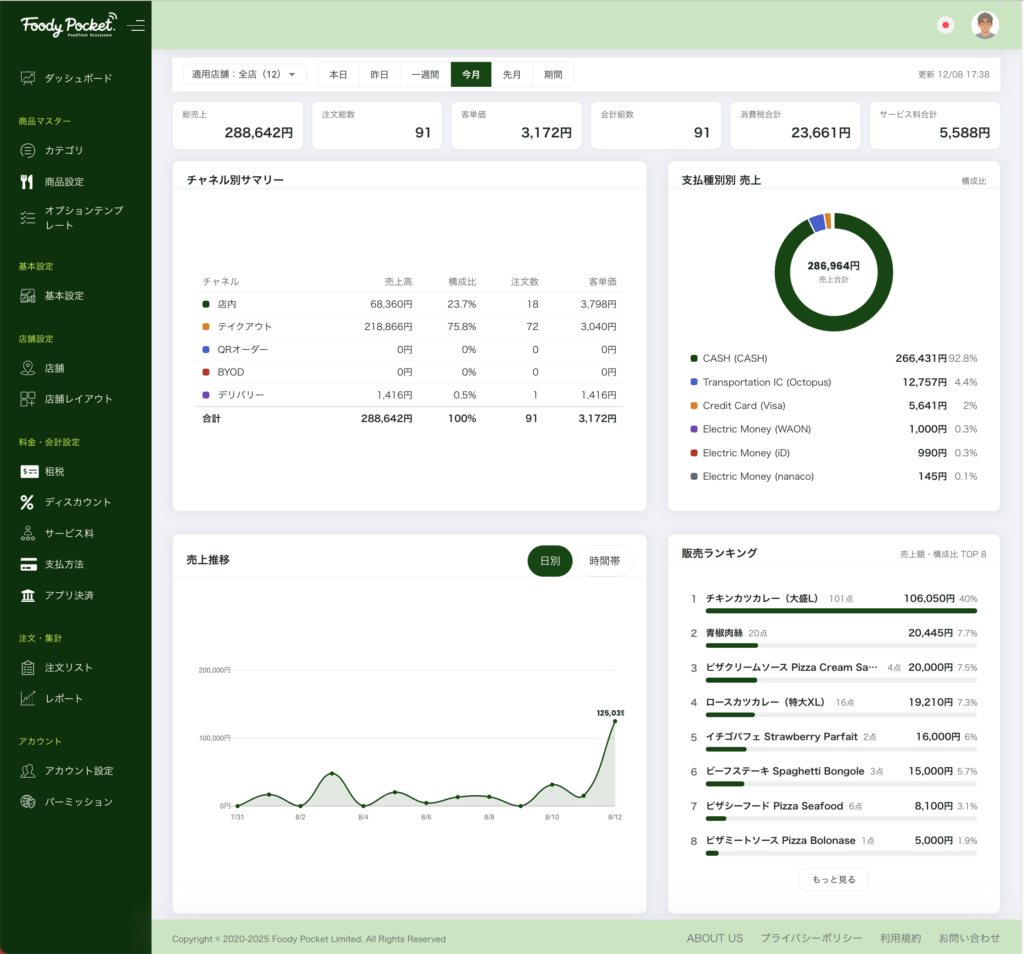
総売上・注文数・客単価・会計組数・消費税・サービス料を画面上部に集約し、その下にチャネル別サマリー、支払種別の構成比、売上推移、販売ランキングを配置しました。期間は本日・昨日・一週間・今月・先月・任意期間から選べ、売上推移は日別と時間帯別を切り替えられます。

複数店舗を運営されている場合は、店舗を絞り込んでの表示にも対応しています。表示は日本語・英語・繁体字の3言語に対応します。

The dashboard now presents total sales, order count, average spend, covers, consumption tax and service charge at a glance, with a channel-by-channel summary, payment mix, sales trend and product ranking below. Switch the period between today, yesterday, one week, this month, last month or a custom range, and toggle the trend between daily and hourly. Available in Japanese, English and Traditional Chinese.

02販売チャネルを整理しました

NEW店内・テイクアウト・デリバリー・QRオーダーの4分類

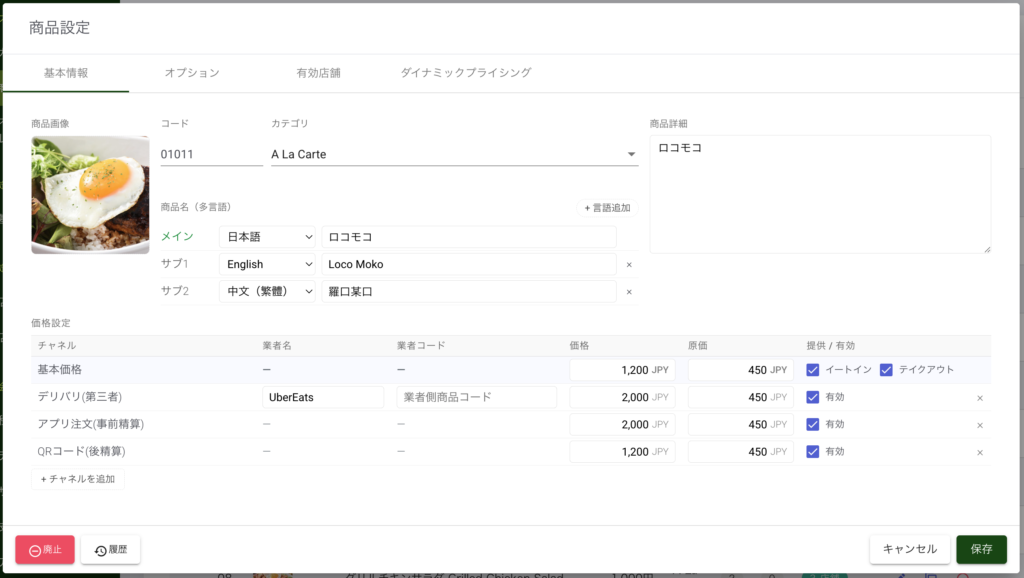
お客様のご利用シーンに沿ってチャネルを整理しました。チャネルごとに商品の販売可否と価格を設定でき、デリバリーは業者ごとの価格設定にも対応します。設定した内容は POS のメニュー、WebOrder、注文リスト、レポートのすべてに反映されます。

イートインとテイクアウトの可否は、チャネル別の有効・無効として整理し直しました。従来より意図した通りに設定できます。

Sales channels are now organised around how the customer orders: dine-in, takeout, delivery and QR order. Availability and price can be set per channel, with per-provider pricing for delivery. Settings flow through to the POS menu, WebOrder, the order list and every report.

03商品マスタを大幅に強化しました

NEWExcel・CSV による一括登録

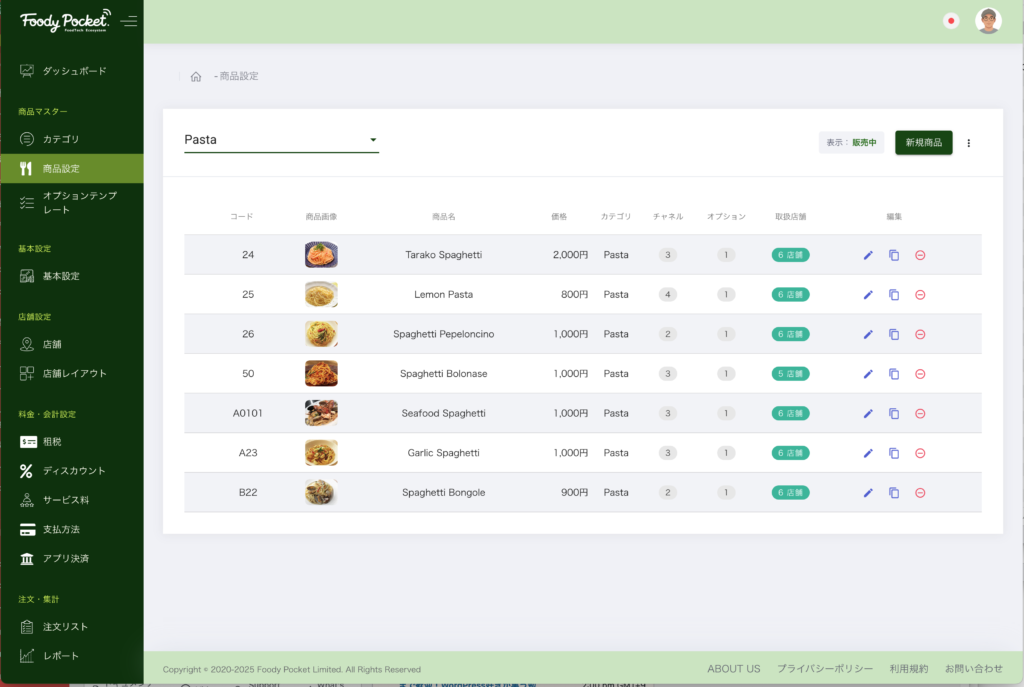
商品情報をテンプレートに書き出し、まとめて編集してから取り込めるようになりました。チャネル別価格や販売可否もテンプレート上で設定できます。新規開店時の初期登録や、価格改定の一括反映が大幅に短縮されます。

Export your products to a template, edit them in bulk, and import them back. Channel pricing and availability are included in the template — a substantial time saver for new store setup and price revisions.

NEW改廃管理と変更履歴

商品の販売終了・再開を管理できるようになりました。あわせて変更履歴を保持し、いつ・誰が・何を変更したかを後から確認できます。価格改定の経緯確認や、誤操作の調査にご利用いただけます。

Products can now be discontinued and restored, and every change is recorded so you can see who changed what, and when.

NEW多言語の商品名

1つの商品に対して、日本語・英語・繁体字それぞれの商品名を登録できます。WebOrder や QR オーダーでは、お客様の言語に合わせて表示されます。

Register a product name in Japanese, English and Traditional Chinese. WebOrder and QR ordering display the name matching the customer’s language.

04オプション設定が柔軟になりました

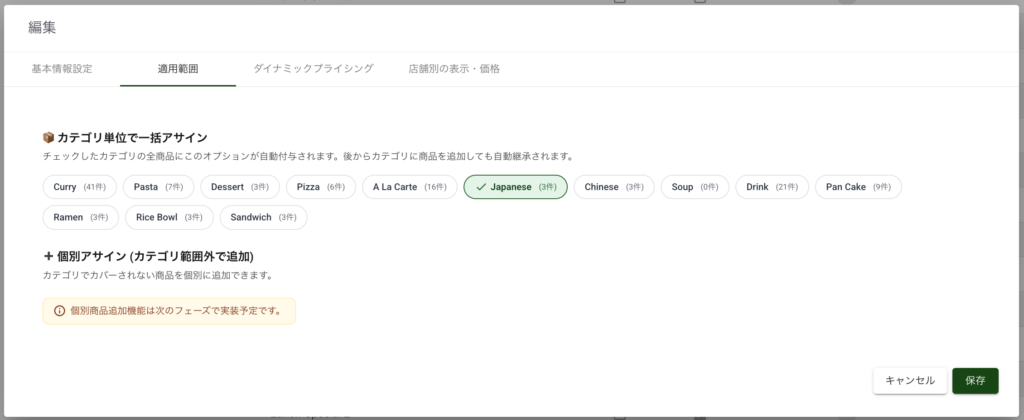
NEWカテゴリ単位でまとめて割り当て

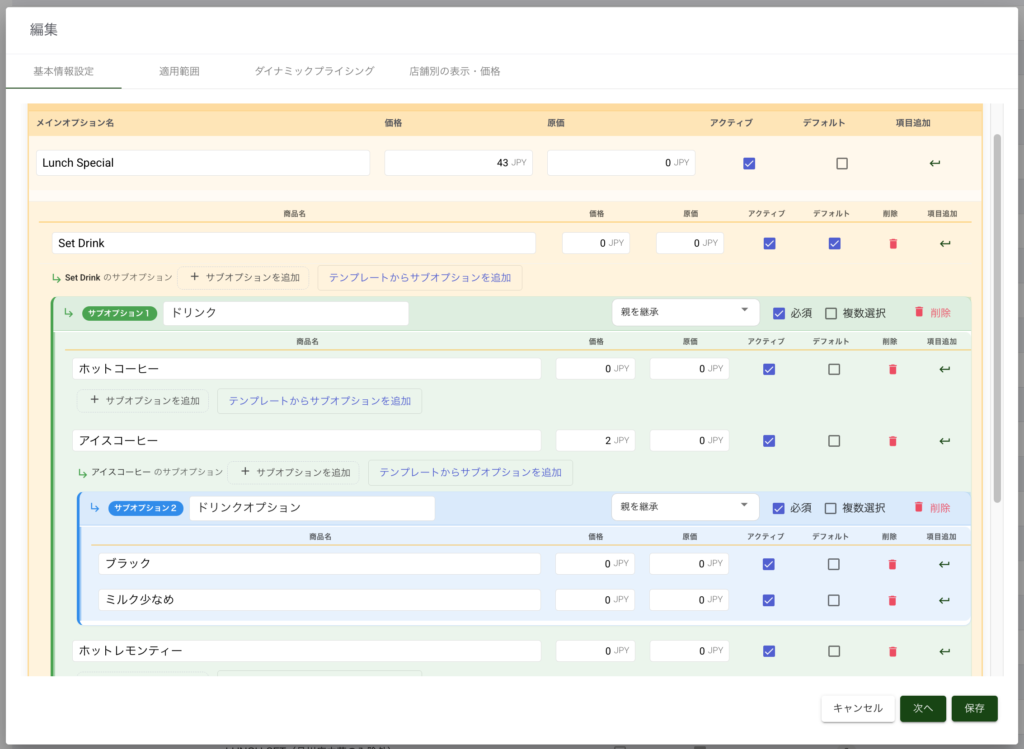
オプションをカテゴリ単位で一括割り当てできるようになりました。「ドリンク全品に氷の量を付ける」といった設定が一度で済み、特定の商品だけ対象から外すこともできます。

Assign an option group to an entire category at once — and exclude individual products where it does not apply.

NEW店舗別の表示・価格設定

オプションごとに、店舗単位での表示・非表示と価格の上書きを設定できます。設定画面も「表示(除外)」と「価格」の2つに整理し、どちらを操作しているのか分かりやすくしました。

Show, hide or re-price an option per branch. The settings screen is now split into Visibility and Price so it is clear which you are editing.

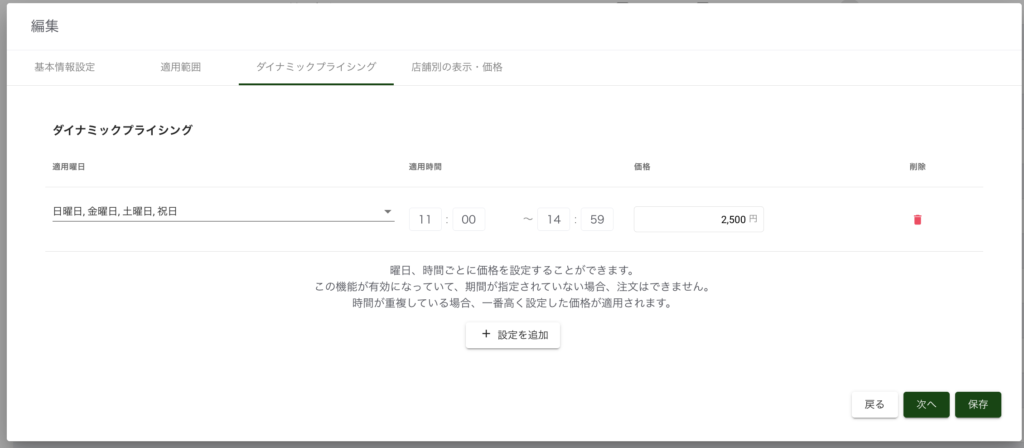
NEW時間帯による価格変更(ダイナミックプライシング)

時間帯に応じて商品・オプションの価格を変更できます。ランチタイムの価格設定などにご利用いただけます。価格のみが変わり、商品そのものはメニューに表示され続けます。

Change prices by time of day, for example a lunch-time rate. Only the price changes — the product itself stays on the menu.

05割引・クーポン機能を強化しました

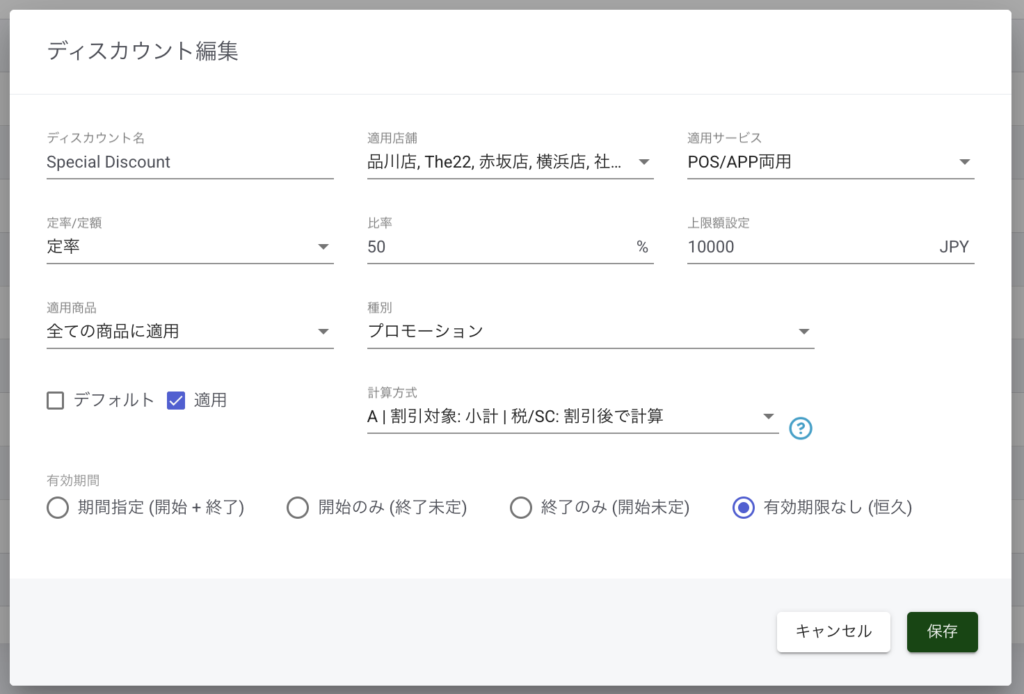
NEW有効期間の指定

割引に開始日時を設定できるようになりました。期限を設けない運用にも対応し、一覧では有効・期限切れ・開始前がひと目で分かります。期間外の割引は POS の選択肢に表示されません。

Discounts can now carry a start date, or no expiry at all. The list shows active, expired and not-yet-started at a glance, and out-of-period discounts no longer appear on the POS.

NEW計算パターンの選択と併用不可設定

割引の計上方法を3パターンから選べます。現金券として扱うパターンにも対応し、売上計上とレシート表記が正しく分かれます。また、他の割引と組み合わせられない割引を設定でき、POS では選択時に警告のうえ自動で解除されます。

Choose from three calculation patterns, including treatment as a cash voucher so that recorded sales and the receipt read correctly. Discounts can also be marked as mutually exclusive; the POS warns and clears the others automatically.

06レポート出力を拡充しました

チャネル・割引情報の追加と、税率の自動追従

Excel の注文一覧レポートに、チャネルと割引の情報を追加しました。税率は店舗の設定に自動で追従し、支払種別も店舗で有効なものだけが表示されます。注文詳細画面も、実際の会計の流れに沿った並びに整理しました。

The Excel order report now includes channel and discount information. Tax rates follow the store’s own settings automatically, and only payment types enabled at the store are listed. The order detail screen has been rearranged to follow the actual flow of a bill.

07WebOrder・QRオーダーの改善

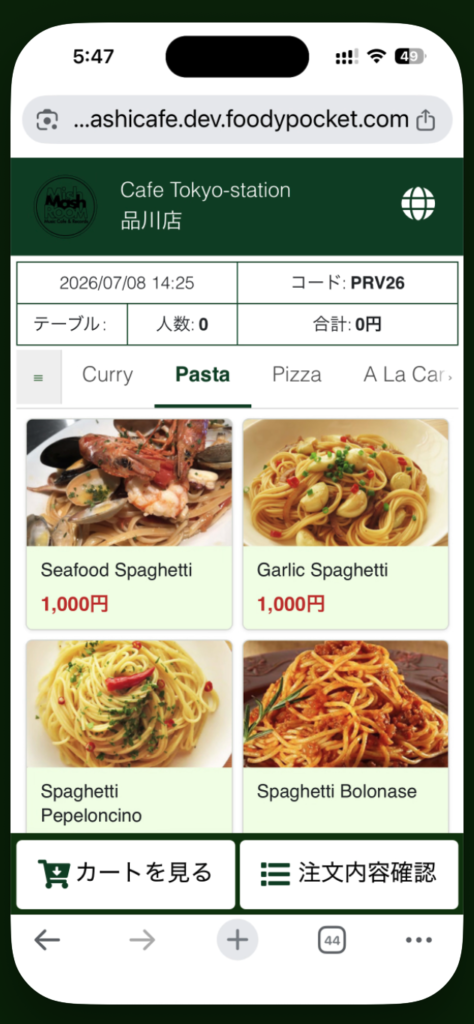
NEWブラウザ型のモバイル QR オーダー

アプリのインストールが不要な、ブラウザ型の QR オーダーに対応しました。管理コンソールの基本設定から、アプリ型とブラウザ型を切り替えていただけます。

Browser-based QR ordering is now supported, with no app install required. Switch between the app and browser types from Basic Settings in the console.

店舗別プレビュー

店舗ごとの WebOrder を管理画面から直接開けるようになりました。公開前に、お客様に表示される画面をそのまま確認できます。

Open each branch’s WebOrder directly from the console to check exactly what customers will see before going live.

08表示速度の改善とセキュリティ強化

管理コンソール全体の高速化

注文リスト・商品一覧をはじめ、管理コンソール全体の表示速度を改善しました。商品点数の多い店舗ほど、効果を実感いただけます。

The order list, product list and console as a whole now load faster — the more products you carry, the greater the improvement.

認証まわりの強化

ログイン・認証の仕組みを見直し、セキュリティを強化しました。あわせて、ログインの有効期限が切れた際の画面の挙動を改善しています。

We have strengthened the authentication mechanism, and improved how the console behaves when a session expires.

POS アプリのアップデートについて

本アップデートに合わせて、POS アプリも更新しています。詳細は「Foody Pocket POS ver. ○.○.○ をリリース」をご覧ください。
The POS app has been updated alongside this release. See the POS release note for details.

今後とも Foody Pocket をよろしくお願いいたします。ご不明な点は担当者までお気軽にお問い合わせください。

Thank you for using Foody Pocket. Please contact your account manager if you have any questions.

Category
Tags

No responses yet

コメントを残す

メールアドレスが公開されることはありません。 が付いている欄は必須項目です